How to Convert PDF to Markdown
Converting PDF documents to Markdown format using PDFelement provides you with enhanced editability, compatibility, and versatility. Markdown is a lightweight markup language that allows you to create structured and easily readable text documents. Follow these steps to convert your PDFs to Markdown format:
- Launch PDFelement and open your desired PDF document. Go to the "Home" tab, click "AI Assistant" > "AI Generate", and select "Generate Markdown."
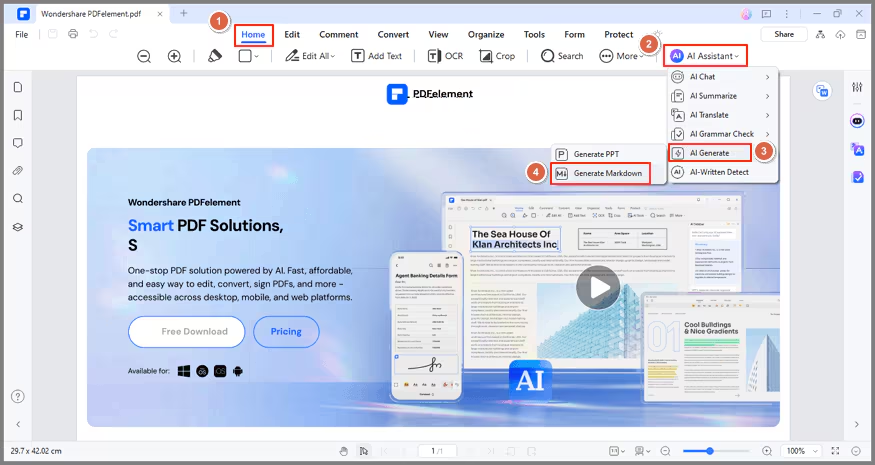
- In the "PDF To Markdown" window, specify "Page Range" and "Output Folder." Click "Convert."

- PDFelement will analyze your PDF, summarizing abstracts, key points, and keywords. The PDF pages will be converted into Markdown format.
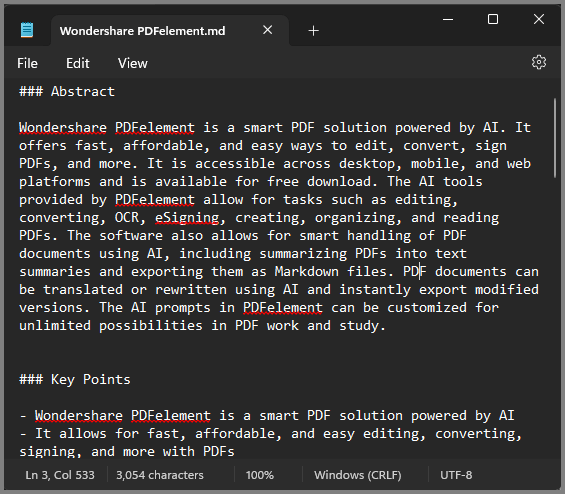
Conversely, you can also convert your PDF to Markdown using the "Convert" feature.