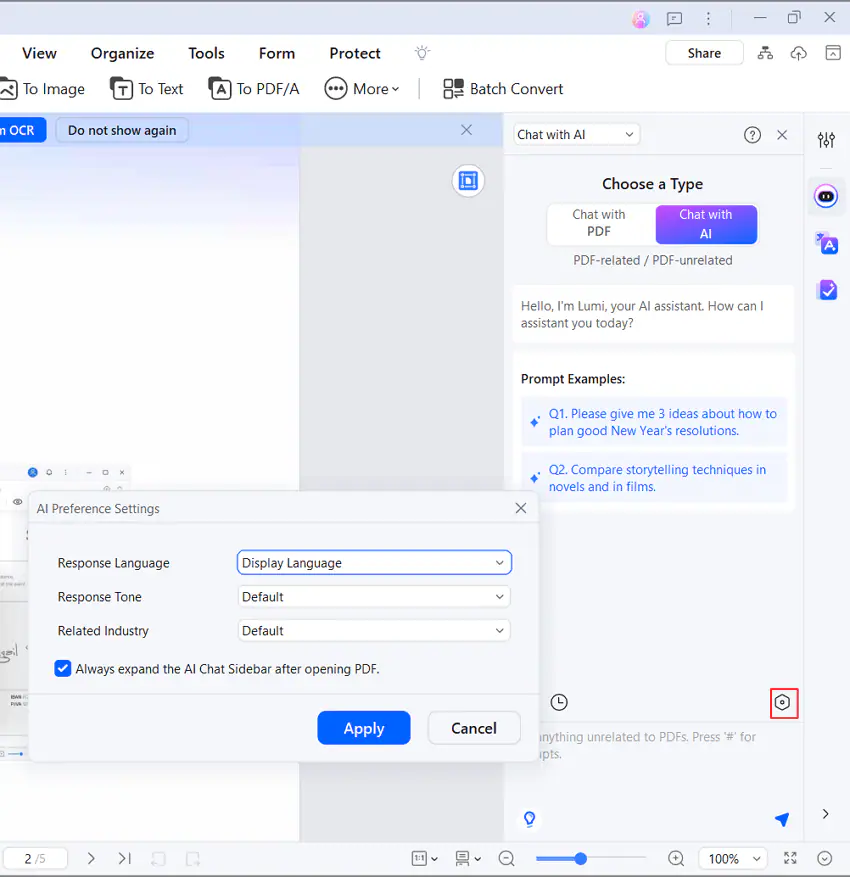
How to customize the AI Assistant.
You can customize the AI Assistant in PDFelement. You can change its response language and response tone. Furthermore, you can select an industry to ensure all responses will be related to it.
- Open a PDF. Click the "AI Preference Settings" on the AI Sidebar.
- Select a "Response Language." The AI will write responses using the language that you select.
- Select a "Response Tone." This allows you to make the responses sound professional, humorous, etc.
- Select a "Related Industry" to ensure that all responses will be relevant to the topic.
- Click "Apply."