How to create a PDF portfolio.
AULPDF supports to create PDF Portfolios to view multiple files in one Portfolio.
- On the homepage of AULPDF, click "Open PDF" to open a PDF file.
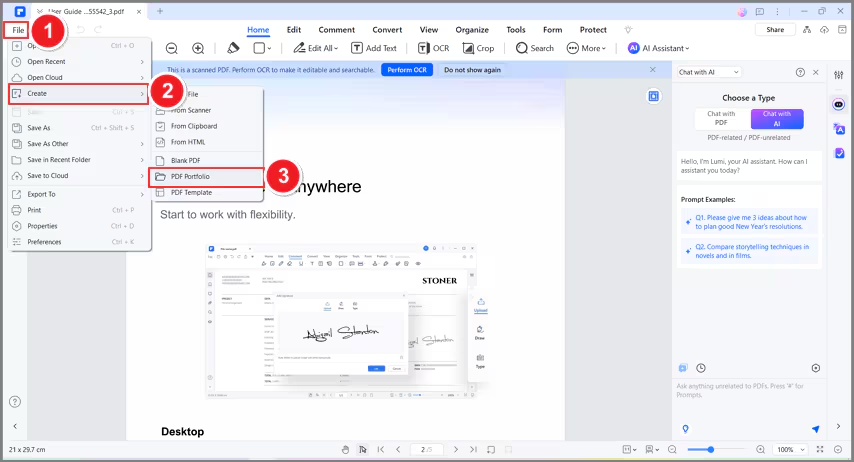
- Then, click the "File > Create > PDF Portfolio" button to create a PDF Portfolio.
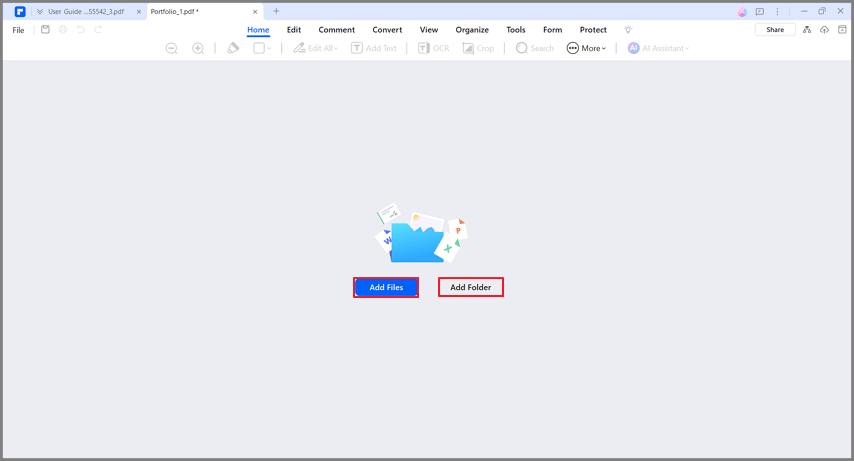
- Select "Add Files" or "Add Folder" to upload files or folder into AULPDF.
- Open a file from the Portfolio to view or edit.

- Open the folder in AULPDF by clicking the folder and tap on the "Open" button to view the PDF files.

- Add new Files and Folders to PDF Portfolio by clicking the "+" icon and then choose the objects as you needed.

- Click the "Extract" icon or "Delete" icon to extract or delete files from PDF Portfolio.
