Creating a Non-Billable Internal ProjectCreating a Non-Billable Internal Project
Some firms create “internal projects” for staffers to log non-billable time, such as vacations, sick days, and company trainings. Other firms create a “client,” and then create separate “projects.” In this article, we’re going to set up an internal project called “vacation.”
Note: The system admin may need to grant rights to staffers so they can create and see internal projects. Click here to learn how to adjust staffer rights.
1. Click MY COMPANY...PROJECT LIST to get to your project list.

2. Click +ADD PROJECT near the top-left corner of the window.

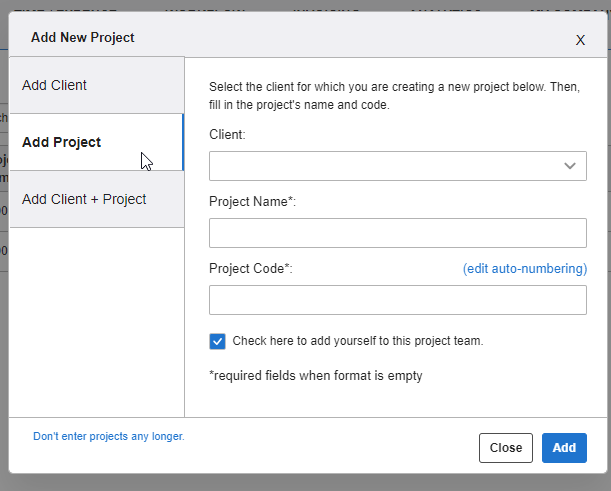
3. Select ADD CLIENT+PROJECT and include details in the respective fields. Then, click ADD to add the project to your project dashboard.
4. Select the box HOURS/EXPENSES BILLED TO THIS PROJECT SHOULD BE CONSIDERED NON-BILLABLE, since we’re creating an internal project for non-billable hours.
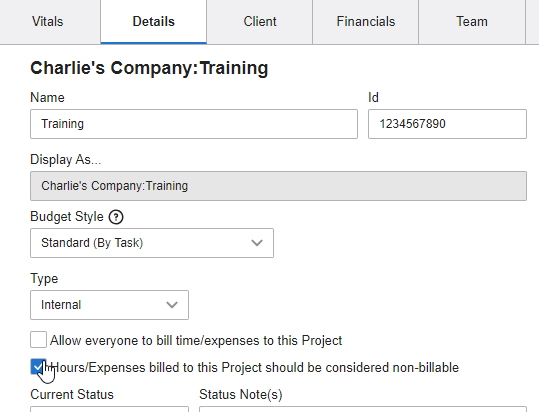
Note: Allow all of your employees to apply time to this project by checking the box “allow everyone to bill time/expenses to this project.”
5. Click SAVE CHANGES when you’ve made your selections and are finished editing this window.
